Halaman

Tampilkan postingan dengan label web blog. Tampilkan semua postingan

Rabu, 14 Juli 2010

Using SSI with WordPress


Server Side Includes (SSI) are a very powerful tool that can be
used to update multiple pages on a site quickly and with minimum fuss.


e.g. Imagine you had a site and you wanted to include a list of
recommended merchants at the bottom of every page.  What happens if one
of the merchants changes their affiliate link, or drops you as an
affiliate, or simply does not convert?  If you site had 100 pages, you
would have to manually update 100 pages and re-upload all 100 pages. 


With SSI, you would have this list of merchants in a single text
file.  You would then “include” that text file in all of the pages on
your site.


If you need to change a link, you simply change the link in the text
file and re-upload that one file.  The merchant list will then be
updated on every single page of your site.


Typically I’ll have 4 or 5 of these “merchant files” for any site I
build.  The list of merchants and ads shown in these files will be
geared towards the section on my site in which they will appear.  e.g.
on a contact lens site, I would probably have one merchant file for the
pages advertising prescription lenses, and another merchant file for
cosmetic lenses (those lenses that are just for appearance).  I might
even have a separate file for “halloween lenses”, and include photos of
vampire eyes, or cats eyes – whatever is hot at the moment.


By keeping my merchant lists to a few separate files, I can quickly
and easily swap out merchants, add in new promotions (e.g. at Halloween
there are always special offers, and these can be added to all
“Halloween” related pages in a few seconds) and have total control over
what ads are showing on the various sections of my website.  If changes
need to be made, I don’t need to edit every page on my site, just my
include files.


Do you see the power of this?


To help with SSI in WordPress sites, there is a plugin I recommend.  I
have it working on a WordPress 2.7.1. installation so can confirm it is
compatible with this version of WordPress.


WordPress Plugin: Include
It


Download and install it.


Now, in an HTML editor (or text editor if you prefer), create the
file that you want included in your pages.   Construct it in standard
HTML.  It can include a table, headers, affiliate links, text, images
etc.  When you have finished the include file, save it to the root
folder of your site.  You can give it any name you want, e.g.
merchants.txt, merchants.html etc.


Now, with the plugin active, simply add the following code in the
position of your WordPress post that you want the merchant list to
appear:


[include file=merchant.txt]


Save your post, and you are finished.


The contents of the merchant.txt file should display in the post.


Add this line to every post you want the list to appear in.  When you
need to change the merchant list, simply edit the merchant.txt file,
and upload it.  The merchant list will be updated on every page that you
added it to.


Do you have any other uses of SSI that you think readers of this blog
would be interested in?  Please feel free to leave comments on this
article below.  You do not need to register to leave a comment.

Sky Drive Attachment WLW Plugin 1.0

Windows Live SkyDrive is a special service that is
provided by Microsoft
for free. It allows you to store and access your personal files from
anywhere online & it gives you an enormous 25GB space. If you are a
blogger and use Windows Live SkyDrive as your online storage then Sky Drive
Attachment WLW Plugin 1.0 is a must for you. As the name says this
plugin is compatible with all the versions of Windows
Live Writer
and is supported on Microsoft Windows XP and Windows
Vista. This plugin is pretty simple to use. It allows you to access and
manage your Windows Live SkyDrive
account right from Windows Live Writer interface. You can use Windows
Live SkyDrive Attachment
Plugin to upload, and use your file within your blog posts as
attachments. All you have to do is insert your login details and all the
files are shown, now you can select the files which you want to use as
an attachment. For easier access this plugin can
also be used from the sidebar of Windows Live Writer. It is an essential
plugin for Windows
Live
Skydrive user, go and download it now!
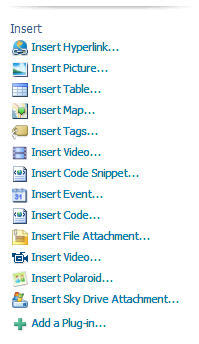
Sky Drive Attachment WLW Plugin 1.0 in sidebar
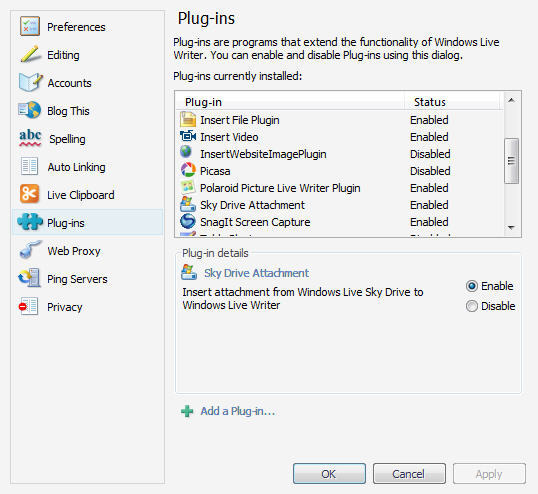
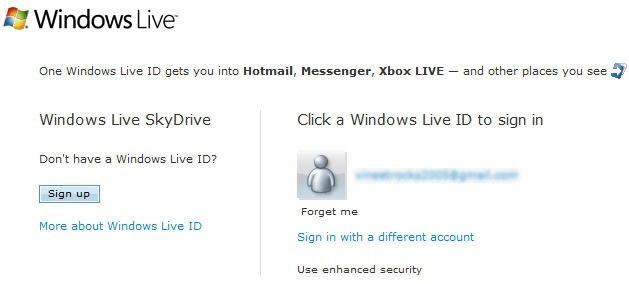
Sky Drive Attachment WLW Plugin 1.0 in WLW Plugin ListSky Drive Attachment WLW Plugin 1.0 Asking for Login Details

Selasa, 13 Juli 2010

Using server-side includes (SSIs) to add content to your web pages

What is an SSI?

A server-side include is code in a web page that tells the
server to add some specified information at that point in the page. It's
a way to extend the content of your page in some useful ways.


Caution: SSIs don't work on every web
server, and the details vary from one to another. This page describes
features which I know work on Apache and Microsoft IIS servers, and are
probably applicable to others.


Ask your web hosting company if (a) you can use SSIs, (b) what file
naming conventions you have to use for them to work, and (c) where you
should keep the files that use them. Then, as long as the answer to (a)
is yes, you can get started.


How do they work?


Unless otherwise instructed, a web server just sends the content of a
web page to the client, your browser. But for an SSI to work, the
server must parse (read) the file, find all the SSIs, and process them
before sending the content to the browser.


The web server can be set up to parse all files (not usual), in which
case, you can name your files with the usual .htm
or .html extensions. However, the usual case is
to have a specific extension set up for parsed files - usually .stm, .php or .asp.
If you use the wrong extension, the SSIs will just be ignored. The
folder that holds them must have appropriate execute or scripting
permissions too, or they will not work.


What can they do?


There are three main uses: to take standard text from another file
and insert it into the page (include files), to insert the value of a
variable quantity into the page, or to run a CGI script other than as
the action of a form.


I'm going to cover the basics here: include files, and some
variables. Many ISPs forbid the running of executables this way because
it can be a security risk, so I'm not going to discuss them here. If you
want detailed information on everything that can be done, a useful
starting point is the link to external site Apache site, or if you have a commercial web
server, the manufacturer's site or the online help should have details
of which directives and variables are available for its product.


Including files


To include some standard text (for example, a disclaimer or
copyright), put one of these lines in your parsed web page where you
want it to appear:


<!--#include file="<em>filename.ext</em>" -->
<!--#include virtual="<em>/path/filename.ext</em>" -->

Note that although this looks like an HTML comment, you must put a
space before the closing -->. Use the first
form if the file is in the same directory or you are specifying a
relative pathname (e.g. ../../copy.inc); the
second for an absolute path (e.g. in another virtual directory - /includes/footer.inc), but never a full HTTP URL. The
file should contain either plain text or HTML markup (inbcluding scripts
of couurse), and can have any name you like, though a .inc
extension is conventional.


Example:


If the file copy.inc includes this text:


<p>The complete contents of this site are copyright <br />&copy; Lois Wakeman 1999-2008 except as expressly noted.</p>

then, if you have this code in your web page:


<!--#include file="copy.inc" -->

you will see this in the browser:


The complete contents of this site are
copyright © Lois Wakeman 1999-2008 except as expressly
noted.


Adding variables to the page


The web server has access to certain standard variables and file
information, which you can put in your page. The most useful for the web
page author are probably:


  • <!--#flastmod virtual="/path/filename.ext"
    -->
    , and its file equivalent, which return the last modified
    date for the specified file.
  • <!--#fsize virtual="/path/filename.ext"
    -->
    , and its file equivalent, which return the size of the
    specified file.

    For example, on a downloads page, it might be useful to have this
    code:


    <a href="/help/styles.zip">Download</a> this file,<br />size <span class="highlight"><!--#fsize virtual="/help/styles.zip" --></span><br />(last updated on <span class="highlight"><!--#flastmod virtual="/help/styles.zip" --></span>).

    which appears in the browser like:


    Download
    this file, size Kb
    (last updated on ).


  • <!--#echo var="variable" -->,
    which returns one of a number of variables concerning the web server's
    environment, the current page, how it was fetched, by whom, etc. Some
    variables that may be useful for web pages are DOCUMENT_URI,
    DATE_GMT, DATE_LOCAL,
    and LAST_MODIFIED, for example:
    • This document can be found at http:/
      - variable DOCUMENT_URI
    • It's
      in Uplyme - variable DATE_LOCAL
    • The page was last modified on
      - variable LAST_MODIFIED


Pros and cons


If you have a large site with a lot of common page elements, include
files can make a big difference to how easy it is to maintain the site.
Instead of updating, say, 50 pages with the same menu or navigation bar,
you can just update the include file once.


Because all the processing is done at the server, you do not
introduce any browser compatibility problems using them. For example,
you can insert the last modified date using JavaScript, but that won't
work for everyone.


Because a page containing SSIs must be parsed, there is a small
processing overhead, but this is not generally significant in my
experience - though a very long page might be noticeably slower to load,
I guess. (But you don't have any of those, do you?)


If you have made a mistake on a parsed page (for example, an include
file cannot be found because the path is wrong), users will get a
message different from the familiar 404 error, which may confuse them
(for example, error processing test.asp file).
This is only a problem if you don't test your pages properly before
publishing them!


So, on balance, if you need the facilities offered by them, I'd say
they were worth the trouble of learning and using.

JavaScript "document.write"

One of the most basic JavaScript commands is document.write.
This simply prints the specified text to the page. To print text
literally, enter the text in single quote marks inside parentheses like
so:


	document.write('Hello World!');

The code above will cause the phrase "Hello World!" to appear on the
page.


You can also use document.write to print
variables. Enter the variable name without quotes, like so:


	var mytext = "Hello again";<br />	document.write(mytext);<br />

Note that if quote marks are placed around the variable name, the
variable name itself will be printed (instead of the variable value).
You can also combine variable values and text strings by using the +
sign:


	var colour1 = "purple";<br />	var colour2 = "pink";<br />	document.write('<p>colour1: ' + colour1 + '<br>colour2: ' + colour2 + '</p>');<br />

Notice the way the variable names are used literally as well as for
passing the values. This will print the following:


colour1: purple
colour2: pink


Remember, text inside quotes will be printed literally, text with no
quotes is assumed to be a variable.

colour1: purple
colour2: pink

How to Update Multiple Web Pages Using JavaScript

Using JavaScript, you can create a separate file which contains
content for your web page. To update all the pages simultaneously,
simply update the JavaScript file.

Pros:


  • Easy to implement.
  • Does not rely on any special HTML extension or server configuration.


Cons:


  • Relies on the user having JavaScript enabled.
  • Updates are more tricky than other methods.


Step 1: Create JavaScript File


Create a plain text document and name it with a .js
extension, for example masterscript.js.
Using the JavaScript document.write
method
, enter the content you want to be displayed on every page
like so:


document.write("<div style='color:blue; font-size:12pt;'>");

document.write("© Copyright Myname 2004");

document.write("</div>");


Note: You don't need to include script tags in this file.


Step 2: Add JavaScript Code to Pages


On every page where you want the content to appear, insert the
following code:


<script language="JavaScript" type="text/javascript"
src="masterscript.js">

</script>


To change the content on every page, edit the contents of the masterscript.js file.


How to Update Multiple Web Pages Using Server Side Includes

SSI (Server Side Include) is a simple and robust way to include
common content in multiple pages. In a similar way to the client-side JavaScript method, SSI involves having a separate file which contains the content you wish to appear on multiple pages. To update the content, you only need to edit a single file.

Pros:
  1. Server-side is safer than client-side (it doesn't rely on any
    browser settings).
  2. Updates are very fast and easy.

Cons:

  1. Slight performance overhead at the server end (every SSI page needs
    to be processed by the server before it is served to the user).
  2. You usually need to use a special extension for web pages, e.g. .shtml.
  3. The server must support Server Side Includes (most Apache servers
    do).


Step 1: Create the SSI File


Create a plain text document and name it with a .txt extension, for example navigation.txt. Save
this file in a folder which is accessible from your whole website. You  may want to make a special folder for this type of file, e.g. /includes/.

Into this file, enter the content you want to be displayed on every  page, for example:


<div style='color:blue; font-size:12pt;'>

<a href="page1.shtml">Page 1</a> | <a
href="page2.shtml">Page 2</a> | <a
href="page3.shtml">Page 3</a>

</div>


Step 2: Insert the SSI Code into Your Pages


On each page, at the point where you want to the content to appear,  place the following code:

<!--#include virtual="/includes/navigation.txt"
-->

To update the content, simply edit the main SSI file and all pages  will automatically update.


Notes:

  • In most cases you will need to change the file extension of your web
    pages to.shtml. If this doesn't work, ask
    your provider for help.
  • If you're creating your pages on a home computer, the SSI includes
    will not show up unless you're running a personal web server. You will
    probably need to upload the pages to your website before you see it all
    work properly.


Rabu, 09 Juni 2010

Setting up BlogRolling.com

BlogRolling is a Blogroll webservice that helps people manage the linklists on their blogs. It is easily set up and allows the user to add, delete, or reives links. You can also change the theme of your linklist to match the theme of your site. It helps to order links alphabetically, randomly, or by date. It is helpful for professional bloggers.


Up until now I'd been maintaining this list in various different ways through the years: hand-updated, various small link directory scripts, and finally Movable Type. However, I usually have around 50 links on my list, and it was getting tiresome to have to click on each link every single day to see if the site had been updated. And this, boys and girls, is the main reason I switched to BlogRolling: it keeps track of when blogs are updated, and newly updated blogs can be distinguished in your list, by adding an image or some HTML to that link automatically. Even better, you can sort the links by last updated date, having the most recently updated site at the top.
Sound good? Read on, because I'll explain in full detail how to use this and customize it to only show the last 10 (or any other random) in your sidebar, and the full list on a separate links page.
And if you're not interested in using blogrolling on your own site, read the tutorial on Pings instead. It will explain how you can make your blogging system notify blogrolling.com whenever your blog has been updated, so that you'll appear at the top of other people's link lists and get more hits. :)
This is all quite easy to do, I promise. :)

Minggu, 06 Juni 2010

Cara terbaru dab tercepat untuk Meningkatkan PageRank.

Meningkatkan Page Rank Blog dalam waktu singkat? Ini TIPS MENINGKATKAN PAGE RANK TERCEPAT, hanya dalam sekali Up date Page Rank Blog naik menjadi 3. Woww! Tenang, pelan-pelan dan perhatikan kemudian praktekan dengan teliti supaya tidak salah langkah dan usaha untuk menaikkan page rank tidak sia-sia.

Bagaimana caranya?

Belajar Seo tentu saja. Meningkatkan Page Rank dimulai dengan mencari Backlink . (ya.. itu mah udah tahu..) Tenang dulu. Backlink yang di cari bukan sembarang backlink melainkan backlink berkualitas yang bisa meningkatkan page rank dengan cepat yaitu Backlink dari blog yang Ber Page Rank 3 ke atas.

Untuk meningkatkan Page Rank menjadi PR 3 hanya perlu 1 buah backlink dari situs ber Page Rank 5.


Seperti yang diberitakan CheckPagerank.net, untuk menigkatkan Page Rank menjadi PR 3 kamu cukup mendapat backlink 1 buah dari blog PR 5, cara lain meningkatkan Page Rank menjadi PR 3 yaitu dengan cara mendapatkan backlink sebanyak 19 buah dari Blog PR 3! bukan Sesuatu yang sulit kan!


Itung aja.. Kalo sehari kamu dapat 4 Link PR 3 saja, dalam 5 hari kamu sudah memperoleh 20 backlink, maka kamu akan mendapat Page Rank 3 dalam sekali update.


Susah nyari blog ber PR 3 ke atas? tenang backlink dari blog PR 1 pun bisa meningkatkan Page Rank blog kamu. Siap-siap deh kamu blogwalking ke blog ber PR 1 minimal sebanyak 555 Blog . jangan pustus asa dulu, bayangkan kalau blog yang memberi kamu backlink page rank nya juga naik, otomatis page rank blogmu juga akan naik, jadi jangan sungkan untuk berkomentar di blog orang lain, jadi mulailah dari diri sendiri, mulailah saat ini, mulailah di BLOG INI..


Meningkatkan Page View Website dan Blog dengan Popup Windows Automatically


Popup Windows Automatically adalah suatu perintah pembuka Windows atau disebut juga popup dengan menggunakan javascript, dimana cara kerjanya yaitu jika kita mengakses Blog yang telah terpasang script popup Windows automatically, maka otomatis akan terbuka halaman baru yang bisa berupa halaman blog maupun iklan advertising.

Rabu, 12 Mei 2010

Cara Posting di Blogdetik Lewat E-mail


Anda sedang berada di luar ruangan dan tidak sempat membuka laptop? 
Blogdetik menyediakan fasilitas posting blog lewat e-mail. Ikuti langkah- 
langkahnya berikut ini: 

Login ke e-mail Anda 

Klik tombol menu untuk mengirim e-mail 

Pada kotak tujuan e-mail (To), ketikkan alamat e-mail ini:post@blogdetik.com 

Pada kotak judul e-mail (subject), ketikkan judul artikel blog yang  akan Anda tulis 

Lalu pada kotak isi e-mail, sebelum mulai menulis artikel, tuliskan 
username, password dan nama blog Anda (tanpa akhiran blogdetik.com) dengan format sebagai berikut : 

<username>spasi<password>spasi<nama blog> 

Tekan enter lalu silakan ketikkan isi artikel blog Anda 

Jika telah selesai, klik kirim (compose


Contoh mem-posting artikel blog lewat e-mail: 
Misalkan alamat blog Anda adalah www.belajarblog.blogdetik.com, dengan username blog: blogku dan password: 123456. 

Anda ingin mem-posting artikel berupa informasi makanan kuliner yang Anda cicipi di sebuah tempat, dengan judul tulisan: Ayam Bakar Taliwang ala Resto Ubud. 

Untuk mem-posting blog lewat e-mail, formatnya adalah: 
Subject : Ayam Bakar Taliwang ala Resto Ubud 
Isi email : 
<blogku>spasi<123456>spasi<belajarblog> 
..................................<isi blog>............................................ 
.......................................................................................... 
.......................................................................................... 
.......................................................................................... 
.......................................................................................... 

Sabtu, 24 April 2010

How To Start A Blog That Gets Instant Traffic


Starting a new blog can feel like an overwhelming task. Not only does it involve either developing your own template (or finding a free one), creating interesting content that people will want to read, and making the blog SEO optimized, but once you're finished developing that amazing new blog, you need to somehow get people to start visiting.
With millions upon millions of websites on the Internet, and with potentially hundreds of thousands focused on the same subject or niche that you are – developing an audience can feel even more overwhelming than trying to start a blog from scratch in the first place.
I've been working on the Internet long before it became wildly popular in the 1990s, and in the process of watching the evolution of the Internet I've come to realize and appreciate something amazing about the current incarnation of the Internet, known as Web 2.0. That something is this; If you know the rules of the game, then it is possible to start a blog that gets instant traffic from day one – and maintains that traffic into the future. Today I'd like to share 3 powerful techniques you can use to accomplish this.

Tip #1 – Write Optimized Content The First Day You Start A Blog

Many people who start a blog do so because they love writing. That's one of the reasons I started several blogs (horribly neglected) of my own. The problem is that most writers enjoy writing for the love of the process – not for the purpose of "optimizing" the content for search engines. The process of optimizing makes writers feel stifled, non-creative and cheap. Sort of like not wanting to go to Wal-Mart to save money even though you know that things are a heck of a lot cheaper there.
Writers know that optimizing is important to gather search engine traffic, but they either really understand the rules – or they simply don't care. Optimizing can take years to learn how to do effectively. Many bloggers suffer low blog traffic because they believe if they simply write amazing content – people will love it so much they'll keep coming back for more. This may be true – but it'll take you years to accomplish, versus months if you use SEO effectively.
Abhijeet offered a fantastic list of SEO tools that you can use to come up with high-value keywords for your posts. One of those tools that I would highly recommend to all bloggers is the Google Adwords tool. Using this tool the right way, you'll be able to start writing your very first blog posts that target exactly what people are searching for online.
What's the "right way" to use Google Adwords? It's very simple, just brainstorm general topics that you want to write about and enter those, one at a time, into the "Descriptive words or phrases field." When you click "Get keyword ideas," you'll see a very long list of keywords and statistics appear at the bottom. Next, click on the blue column header "Global Monthly Search Volume" to sort the results by how many searches occur for each term every month.
If you find your keyword doesn't have a lot of traffic, scroll down to the section titled, "Additional Keywords to Consider."
Here's the basic SEO rule #1 that I'm going to share with MUO readers. Most bloggers see a keyword with very high search traffic and think, "oooh, a goldmine!" They then proceed to expend tremendous effort writing up a brilliant post using that phrase, only to end up on page 25 or 30 of Google results for that search term. Why? Because the secret of success when choosing keywords where your new blog (or even professional blog) can compete is choosing keywords with very low competition (that cool-looking blue bar graph on the left). Choosing keywords with very high search traffic each month and very low competition will bring traffic to your site the moment Google next crawls your blog. Speaking of which, did you take Karl's advice and submit your site to Bing and Google yet?

Tip #2 – Engage The Blogosphere Every Single Day

If you want to get a lot of traffic to your new blog from day one, you've got to give people who are interested in the topics you write about a good reason to visit your blog. One of the first things that I noticed when I started using Facebook is that it's human nature for people to check out your wall if you take the time to post on theirs. The same is very true about the world of blogging, but on a much larger scale.
When you post a thoughtful comment on someone else's blog, not only will the blogger probably check you out, but so will readers who like your comment. To do this effectively, you should use a tool like Ratingburner or Technorati to find the most popular blogs on the net within the niche that you write about.
Using Technorati to find similar blogs to my own blog FreeWritingCenter, I discovered one high-authority blog, AListApart, with fresh content just waiting to receive a good comment. You may need to sift down the list for blogs that are relevant to yours (I did).
Visit the other blogs, and if you aren't already a subscriber then become one. Your new blog will not take off unless you're ready and willing to engage the blogging community and contribute to other blogs as much as you want other people to contribute to yours. When you post a comment – don't do it without reading the post you're commenting on. Don't be one of those annoying spammers – you're trying to engage a community, not get free marketing for yourself.
The general rule of thumb here is to only post on blogs that allow you to include your URL, be positive and always compliment the blogger, and finally always reference one or two important points in the blogger's post – this proves that you actually read the article and found it interesting. A well written comment can go a very long way toward immediately attracting interested readers (and fellow bloggers) to your own blog.

Tip #3 – Becoming an Active Member of the Forum Community

The third most effective way to get instant traffic to your blog is to engage forum communities filled with folks who share an interest in the topic that your blog covers. Either generate a new thread, or comment on an existing thread that covers something you wrote about.
Finding a forum based on the topic of your blog is usually as simple as typing it into Google as something like, "writing forums." Although, I would highly recommend taking Darko's advice and useforum search engines which are often far more effective since they specifically target forums. Using BoardReader, I found a great webmaster forum post about writing at the V7 Network.  When you register, don't forget to include your URL in your forum profile (most forums have a field for this).
Forum etiquette is to avoid posting your own URL in the very first few posts. Simply engage in a conversation with forum members. Once you prove to the forum administrators that your goal in engaging the forum community is to have a conversation and not just advertise yourself, they'll be far more willing to let you quote (and link) from your own blog every now and then. But the first step at any forum is just to get engaged in a quality conversation with other folks.
Forums can help in a lot of ways. Readers who find your comment interesting may click on your profile to check out who you are – and there, they'll find the URL to your blog. Additionally, many forums (such as the one above), allow you to post a link in your signature after you've made a certain number of forum posts. This assures the forum administrators that you're not only there to market yourself, and it eventually allows you to have a link back to your blog on every single post you make – which is a very powerful way to get a lot of traffic to your blog.
Forget about all of the silly instant marketing gimmicks that you find online from "SEO experts" that claim they can get you thousands of visitors a day. The unfortunate fact is that these are typically scams that use spamming techniques that'll get you penalized by Google in the end. The most effective way to "grow" your blog in a very organic and long-lasting way is to make sure all of your content is optimized, and then start spending an hour or so a day just engaging the online community that shares your interests.
Do you have your own unique techniques to draw instant traffic to a new blog? Share them with other MUO readers in the comments section below.